
GAME OVERVIEW
Live Roulette is played by spinning a small ball on a round wheel with thirty-seven number pockets. When the ball comes to rest in one of them, the winning number is defined.
The objective of the game is to predict the number on which the ball will land by placing one or more bets that cover that particular number. You win if you have placed a bet that covers that particular number. The amount of the payout depends on the type of bet placed.
HOW TO PLAY
Place your bets during the betting time on the Roulette table layout that displays all the standard betting positions.
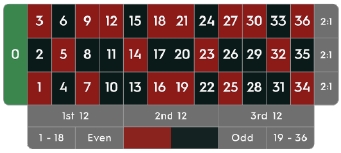
When the betting is open, select the value of the chip and place it on the preferred betting fields on the betting layout. Bets can be placed during the betting time until the bets are closed. No bets will be accepted after this point.
Your total bet in the current round will be displayed in the Total Bet window.
The ball will be spun in the Roulette wheel according to the Valid spin rule described in the paragraph “Roulette Valid Spin Rule” of this text.
When the ball comes to rest in one of the numbered pockets, the winning number will be highlighted and displayed on your screen. If any of your bets cover the winning number, you will receive winnings according to the Roulette payout table. The amount you won will be shown in the winning message.
BETS
You can place many kinds of bets on the Roulette table. Each bet can cover a single number or a certain range of numbers, and each type has its own payout odds.
Bets placed on the numbered spaces or on the lines between them are called Inside bets, while the ones placed on the special boxes below and to the sides of the board are called Outside bets. The numbers included if you bet on that betting field are highlighted.
- Straight Up Bet — place your chips directly on any single number (including zero).
- Split Bet – place your chips on the line between any two numbers (e.g., split 0/2, 16/17).
- Street Bet – place your chips at the lower end of any row of numbers on the Outside Bets side. A Street Bet covers three numbers (e.g., Street 7, 8, 9). Bets placed at the junctions of 0, 1 and 2 or 0, 2 and 3 are also accepted as Street Bets.
- Corner Bet – place your chips at the cross lines where four numbers meet. All four numbers are covered (e.g., Corner 5, 6, 8, 9). A bet placed on 0, 1, 2, 3 (the lower junction of 0 and 1) is also considered a Corner Bet.
- Six Line Bet – place your chips on the T-shaped crossing lines between two adjoining streets. A Six-Line bet covers all the numbers in both rows, for a total of six numbers (e.g., Six Line 4, 5, 6, 7, 8, 9).
Outside Bets
- Column Bet — place your chips in one of the boxes marked “2:1” at the end of the columns to cover all twelve numbers in that column. The zero is not covered by any of the columns.
- Dozen Bet – place your chips in one of the three boxes marked “1st 12”, “2nd 12”, or “3rd 12” to cover the twelve numbers in the sequence 1 to 36. The zero is not covered by any of the dozens.
- Even Chances – place your chips in one of these six boxes to cover the 18 numbers on the board correspondingly: Red/Black, Even/Odd, Low numbers (1-18), or High numbers (19-36). The zero is not covered by any of these boxes.
WHEEL SECTORS
Bets on Wheel sectors is a convenient way for Roulette players to place bets on a large sector of the wheel at once. Each bet covers a different set of numbers and offers different payout odds.
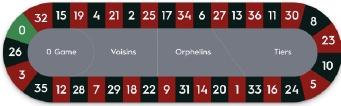


A Single-zero Roulette wheel is split into 3 main sectors that correspond to areas on the table. The traditional names of these sectors are Voisins du Zero with a subsection 0 Game, the Tiers Du Cylindre section, and Orphelins.
Voisins du Zero is a 9-chip bet that covers 17 numbers: zero, plus seven numbers on the right and nine numbers on the left. Marked as Voisins in the racetrack, this is the largest sector of the wheel. The chips are placed as follows:
- 2 chips on the street bet 0/2/3
- 1 chip on each of splits 4/7, 12/15, 18/21, 19/22 and 32/35
- 2 chips on the corner bet 25/26/28/29
0 Game is a 4-chip bet that covers zero and the closest neighbouring numbers. The chips are placed as follows:
- 1 chip on the straight-up bet: 26
- 1 chip on each of splits 0/3, 12/15 and 32/35
Tiers du Cylindre is a 6-chip bet that covers 12 numbers that include 27, 33 and the numbers that lie between them, marked as Tiers on the racetrack. The chips are placed on the split bets of its 12 numbers:
- 5/8, 10/11, 13/16, 23/24, 27/30 and 33/36
Orphelins is a 5-chip bet that covers the numbers on the racetrack not covered by the Voisins du Zero and Tiers du Cylindre bets. The chips are placed as follows:
- 1 chip on the straight-up bet: 1
- 1 chip on each of splits 6/9, 14/17, 17/20 and 31/34
NEIGHBOUR BETS
These are bets which can be placed according to the numbers as they appear on the Roulette wheel, rather than the Roulette layout. Neighbour bets can be placed using a Roulette Racetrack.
A Neighbour bet is a 5-chip bet distributed on the number itself and the two numbers on either side of it on the Roulette racetrack.
The number of selected Neighbours can be decreased to 1 or increased up to 9 on each side.
 Clicking/tapping on a number on the Racetrack during the Bets Open places Straight Up bets of one chip on that number and on each of his neighbours.
SPECIAL BETS
These are a series of multiple bets that are traditionally popular with Roulette fans.
 To open the Special Bets on mobile, tap on the Special Bets/Favourites combo icon, then tap on the Special Bets icon. To close it, tap again on the combo icon.
 To open the Special Bets on the desktop, click/tap the Special Bets icon.
 To close it, click/tap on the “minimize” arrow.
The following special bets are available: Finales en Plein, Finales a Cheval and Full Complete.
Finales en Plein is a French term referring to placing Straight Up bets on all numbers ending in the selected digit. These bets can be also called Finals.
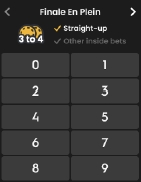
When you click/tap on any of the numbers in the Finales en Plein section, it will result in placing chips on the Roulette layout as follows:
- Finales en Plein 0 — 4-chip bet on 0, 10, 20 and 30
- Finales en Plein 1 — 4-chip bet on 1, 11, 21 and 31
- Finales en Plein 2 — 4-chip bet on 2, 12, 22 and 32
- Finales en Plein 3 — 4-chip bet on 3, 13, 23 and 33
- Finales en Plein 4 — 4-chip bet on 4, 14, 24 and 34
- Finales en Plein 5 — 4-chip bet on 5, 15, 25 and 35
- Finales en Plein 6 — 4-chip bet on 6, 16, 26 and 36
- Finales en Plein 7 — 3-chip bet on 7, 17 and 27
- Finales en Plein 8 — 3-chip bet on 8, 18 and 28
- Finales en Plein 9 — 3-chip bet on 9, 19 and 29
Finales a Cheval are also French-inspired bets in single-zero Roulette where you can bet on pairs of splits ending with the same digit.
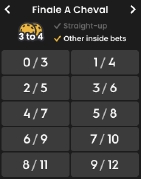
When you click/tap on any of the numbers in the Finales a Cheval section, it will result in placing chips on the Roulette layout as follows:
- Finales a Cheval 0/3 — 4-chip bet on splits 0/3, 10/13, 20/23 and 30/33
- Finales a Cheval 1/4 — 4-chip bet on splits 1/4, 11/14, 21/24 and 31/34
- Finales a Cheval 2/5 — 4-chip bet on splits 2/5, 12/15, 22/25 and 32/35
- Finales a Cheval 3/6 — 4-chip bet on splits 3/6, 13/16, 23/26 and 33/36
- Finales a Cheval 4/7 — 4-chip bet on splits 4/7, 14/17, 24/27 and 34 straight up
- Finales a Cheval 5/8 — 4-chip bet on splits 5/8, 15/18, 25/28 and 35 straight up
- Finales a Cheval 6/9 — 4-chip bet on splits 6/9, 16/19, 26/29 and 36 straight up
- Finales a Cheval 7/10 — 3-chip bet on splits 7/10, 17/20 and 27/30
- Finales a Cheval 8/11 — 3-chip bet on splits 8/11, 18/21 and 28/31
- Finales a Cheval 9/12 — 3-chip bet on splits 9/12, 19/22 and 29/32
A Full Complete bet is the maximum coverage bet that includes all possible Inside bets for an individual number.
When you click/tap any of the numbers in the Full Complete area, a chip of the selected value appears on the corresponding betting positions of the Roulette layout as follows:
- 1 chip on straight-up
- 2 chips on each of the splits
- 3 chips on street
- 4 chips on each of the corners
- 6 chips on each Six Line
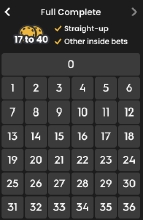
Each number on the layout has a defined number of chips as follows:
- Full Complete bet on 0 — 17-chip bet
- Full Complete bet on 1 — 27-chip bet
- Full Complete bet on 2 — 36-chip bet
- Full Complete bet on 3 — 27-chip bet
- Full Complete bet on 4, 7, 10, 13, 16, 19, 22, 25, 28 and 31 — 30-chip bet
- Full Complete bet on 5, 8, 11, 14, 17, 20, 23, 26, 29 and 32 — 40-chip bet
- Full Complete bet on 6, 9, 12, 15, 18, 21, 24, 27, 30 and 33 — 30-chip bet
- Full Complete bet on 34 — 18-chip bet
- Full Complete bet on 35 — 24-chip bet
- Full Complete bet on 36 — 18-chip bet
FAVOURITES
You can save up to 10 bet combinations as Favourites and use them in future game rounds in the same or in different Roulette games and even on different devices.
To open the Favourites on mobile, tap the Special Bets & Favourites icon, then tap the Favourites icon. Re-tap to close this feature.
 To open the Favourites on the desktop, click/tap the Favourites icon.
 Click/tap the arrow to close.
Place chips on the table and save the combination by clicking/tapping on it.

Additionally, you can save a winning combination by clicking/tapping the Favourites icon displayed on your winning message.
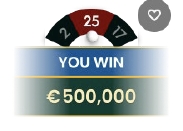
Once your bet combination is saved in your Favourites list, you may use it during the betting time. When you click/tap the selected Favourite bet, your chips will be arranged on the layout accordingly.
You may place several of your saved bets in the same game round and place any additional chips besides those that make up part of the Favourite bet.
You can delete any of your Favourite bets at any time or create new ones.
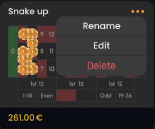
Bet Builder
The Bet Builder feature offers a flexible and convenient way to create customized bets that suit your preferences. With the ability to save and modify the saved bets at any time in the game round, you can optimize your gameplay. Using the Bet Builder allows you to place bets on both the regular betting board or racetrack and save your favourite bets for future use.
Once you create and save a bet, it will appear in the Favourites menu. From there, you can edit or delete the saved bets as preferred.
If you wish to place a bet directly from the Bet Builder, it will only be accepted if the betting is still ongoing.
The Last Winning Numbers
The Last Winning Numbers display shows the most recent winning numbers. The result of the most recently completed round is listed on the left.

Click/tap any number during the betting time to place a straight-up bet on it.
Game Statistics
The Statistics window window provides a wide range of game round details and may help you in deciding which numbers to bet on in future game rounds.
 Click/tap the Statistics icon to open/close the window. Use a slider to view details of up to 500 most recent results.
Inside the window, the complete game statistics are presented, arranged into three sections:
- In the Hot & Cold section, you can find information about the most frequent and least frequent numbers for your selected number of spins.
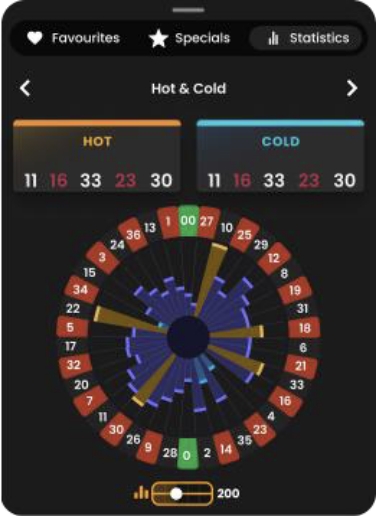
Hot Numbers are those which have won most often. Cold Numbers are those which have won the least number of times.
By hovering your mouse pointer over the sector for each number in the pie chart, you can bring up tooltips showing how many times that number came up throughout the selected number of game rounds. The larger the sector, the greater the number of times that number has won.
- In the Charts section you can find the percentages of Columns, Dozens and Red, Black, Even, Odd, Low and High numbers.
- In the Last Results section, you can find the last winning numbers for a selected number of spins. Hovering over a number will highlight all instances of that number.
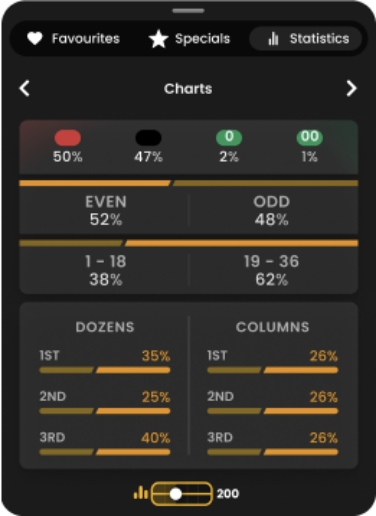
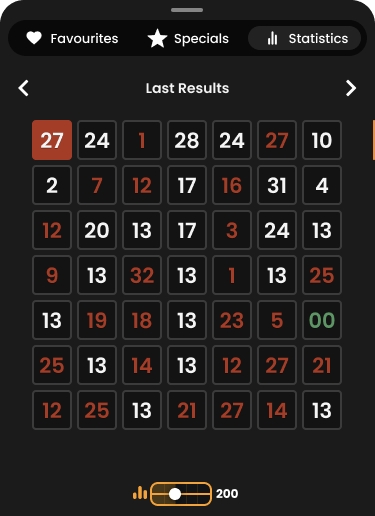
You may place a bet by directly clicking/tapping any value or number in the Statistics section. Bets will be placed with your selected chip value during the betting time. Hover over to see a preview of the highlighted corresponding betting field on the layout and click/tap to place the chip of the selected value.
Placing Bets
When placing bets, please pay attention to the following screen elements to make sure your bets are placed on time and successfully validated.
The Table Name indicates the table you are currently playing at and the Table Limits show the minimum and maximum stakes allowed at the table. When clicking on this area, the Bet Limits & Payouts window is opened showing the minimum and maximum limits for each bet type as well as the payout odds.
The Game Information Indicator informs you of the game status, the remaining time for placing bets, the status of your bets, the winning number, etc.

While PLEASE PLACE YOUR BETS is displayed, you may start placing your bets. The indicator shows the remaining time in green, decreasing to the left
When only 5 seconds of the betting time remain, the status changes to LAST BETS.

Once the betting time is over, BETS CLOSED is displayed, and all betting areas become inactive. The game status will then show BETS ACCEPTED, informing that all your placed bets have been accepted and will participate in the game round.

 The Chip Selector allows you to select the value of the chips you wish to bet with. To see all available chip values on mobile, tap on the chips selector. Only chip values that can be used with your current Balance are clickable/tappable.
 The Re-bet button allows you to repeat the same bets from the previous game round. Once you have clicked/tapped the Re-bet button, the Double and Undo buttons are enabled
 The Double button doubles all your placed bets. Every click/tap doubles your bets up to the maximum limit.
 The Undo button removes the last bet you placed. This button is available only during the betting time. Once bets are closed, you will not be able to undo or change your bets. Clicking/tapping the Undo button repeatedly removes bets one by one, with the most recent bet removed first.
The Balance indicator shows your available funds and currency. Your balance has to be sufficient to cover all your placed bets.
Please make sure that your balance is sufficient to cover your bets before you start playing.
If your balance is not updated after placing bets or after you see a winning message, please try refreshing your game window in the browser or click the F5 key on your keyboard.
 The Cashier button will open the Cashier window for deposits and withdrawals. On mobile devices the Cashier button is available inside the game Menu.
 The Total Bet indicator shows the total value of all bets placed in the current game round.
Game Result
The winning number of the game round is indicated on the layout with an animated circle around it. This helps you to check whether it was covered by your chips.

A graphical representation of the Winning Number is also shown at the top of the video. If you are the lucky winner, your win amount is indicated below it.
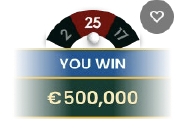
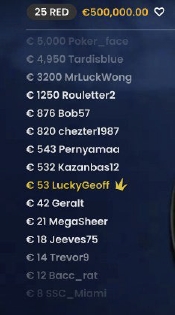
The Winners List appears at the same time as the winning number and shows the nicknames of all the players who won at the current table in the last game round. The winning amounts are shown in the currency you selected for your account.
Navigation Controls
 The Lobby button can be clicked/tapped at any time from any game. It allows you to easily change table, select any other live game or simply leave the table. You will not be removed from your current table until you have selected the new table you wish to join, so the Lobby can be used to browse other games while remaining at the current table. Once on the lobby page, please click/tap the Return to Game button in order to exit the lobby and return to your open table.
 Clicking the Chat button opens the chat window so you can send messages to the Dealer and other players. Our Dealers communicate with you directly and answer any questions regarding the game.
 If you need to speak with our Live Support team, please select the corresponding chat room by clicking the Support button and you will be assisted in a private chat.
Chat messages are monitored by dedicated Studio personnel at all times. Any chat messages may be deleted, and your chat feature may be blocked if you use inappropriate or rude language with the Dealers and/or other players at the table or flood the chat with unnecessary messages.
 Clicking the Volume Control button opens a slider which lets you change the sound volume at your table. Clicking the Volume control button mutes the game – it will then turn into a “Muted” icon.
 By default, the game is opened with muted audio. Please click the Muted button to unmute the game. The icon then turns into the Volume Control button.
 Clicking the History button opens a window showing details of your activity in our Live Casino. By default, it is opened on your history for Today. You can also see your history from previous days by selecting the Older tab.
Simply select a game round from the list to see details of it, including all your bets. The details of your game round history are shown in the History window and split into 2 parts: game round information and bets information.
 Clicking the Game Help button opens the Help window you are in right now.
 Clicking the Settings button opens a Settings window allowing you to set your desired preferences. In the General tab the following options are available:
- Video stream on/off.
- Manage video quality.
- Manage game sounds.
- Change the interface language.
 By clicking the Classic View button, you can change the view of the game to Classic mode where the video is shown inside a small frame. The virtual table is available below the video and the graphical cards are shown for each side.
The game interface may also change automatically to Classic mode if your internet connection is slow or unstable. If this happens, the video is automatically set to Low video resolution.
 Clicking the Full Screen button launches Full Screen mode and the game and/or Lobby fills the entire screen. To exit this mode, either click the button again or press the “Esc” key on your keyboard.
Roulette Valid Spin Rule
A winning number is valid only when the spin is deemed valid. A valid spin is defined as follows:
The Roulette ball must be spun in the direction opposite to the rotation of the wheel and must complete at least three complete revolutions counted from the point where the ball was launched around the track of the wheel before dropping to constitute a valid spin.
If the spin is defined as invalid, this situation is called a “No Spin”.
Situations where a “No Spin” is declared:
- The ball made fewer than 3 complete revolutions.
- The ball was spun in the same rotation direction as the wheel.
- The wheel stopped rotating during the spin.
- A stuck ball, either on a fret, ball stop or number track.
- The ball jumped out of the wheel (ball-out).
- The ball was fumbled/dropped before spinning.
- Any foreign object entered the wheel during the spin.
In the event of a “No Spin”, the re-spin of the ball will be done based on our standard operating procedures.
Your bets will remain in play until a valid spin is made.
Game Inconveniences
If any error in the game procedure occurs, the game round is temporarily paused, and the Shift Manager is notified. You will be informed by an on-screen notification that the issue is being investigated.
If the error can be immediately resolved, the game round will continue as usual. If immediate resolution is not possible, the game round will be cancelled, and initial bets will be refunded to all players who participated in the game round.
A maximum of 95% of the numbers can be covered with bets in a spin. If this limit is exceeded, all your bets are rejected for that spin.
If you wish to discuss any game related issues, please contact Casino Time Customer Support, providing them with details of the game in question including the the game name and the exact time it occurred.
Disconnection Policy
Pragmatic Play Live Casino services are provided over the internet, from which you may be disconnected at times. This poses potential problems to the game flow and your user experience.
After being disconnected, please check your winnings in the History window and if you have any doubts regarding game outcomes, please contact Live Support within the game or Casino Time Customer Support, providing them with details of the game in question including the the game name and the exact time it occurred.
PAYOUTS
The payouts depend on the placed bet type.
| BET TYPE | COVERS | PAYOUT |
| Straight-up | 1 Number | 35:1 |
| Split | 2 Numbers | 17:1 |
| Street | 3 Numbers | 11:1 |
| Corner | 4 Numbers | 8:1 |
| Six Line | 6 Numbers | 5:1 |
| Column/Dozen | 12 Numbers | 2:1 |
| Red/Black | 18 Numbers | 1:1 |
| Even/Odd | 18 Numbers | 1:1 |
| 1-18/19-36 | 18 Numbers | 1:1 |