GAME OVERVIEW
Dragon Tiger is a very popular card game born in Cambodia. Unlimited number of players may participate in each game round like Baccarat.
The objective of the game is to predict which hand has the highest card – Dragon or Tiger. There are no additional cards drawn in the game.
HOW TO PLAY
To start playing, select a bet amount by clicking on a chip from the chips tray and then click on your choice of the following: Dragon, Tiger, Tie or Suited Tie.
You will be allowed to place or modify your bets while the message “PLEASE PLACE YOUR BETS” is shown on the screen.
You may place bets during the betting time until the Dealer announces: “BETS CLOSED”.
The total amount of your bets will be shown in the Total Bet field.
The Dealer will deal one card that will be burned followed by other 2 cards in the following order: 1st card to the Dragon side and 2nd card to the Tiger side. After the betting time is over, the Dealer will reveal the 2 cards dealt to the Dragon and Tiger.
Once the Live Dealer has dealt the cards to each hand and revealed them, the game round will be complete. The side with the highest value card – wins. If the cards value are equal, the game round is a Tie.
On the game user interface, the winning bet fields will be highlighted. If any of your bets cover the winning bet fields, you will receive returns in accordance with the type of bets placed. Your win amount will be shown in the win message.
Once the game round is finished, the Dealer will collect the open cards on the table, place them in the discard and open bets for the next game round.
CARD VALUES
The game is played with 8 standard 52-card decks.
Only the numeric value of each card is relevant in the main Dragon Tiger game; cards’ suits (hearts, spades, clubs or diamonds) are irrelevant.
| Cards | A | 2 | 3 | 4 | 5 | 6 | 7 | 8 | 9 | 10 | J | Q | K |
| Points | 1 | 2 | 3 | 4 | 5 | 6 | 7 | 8 | 9 | 10 | 11 | 12 | 13 |
MAIN BETS
There are three different kinds of main bets in Dragon Tiger that can be placed corresponding to three possible outcomes in Dragon Tiger: Dragon wins, Tiger wins and Tie bet wins (it happens when cards on the Dragon and the Tiger side have the same points). There is also Suited Tie which is similar in outcome as Tie (when cards on both sides have the same points), but they must be suited.
Bets can be placed on the designated areas on the graphical game layout on the UI. Traditionally in Dragon Tiger game the betting field is marked with red color for Dragon, yellow colour for Tiger and green colour for Tie & Suited Tie.
A winning bet on Dragon is paid at 1:1.
A winning bet on Tiger is paid at 1:1.
A winning bet on Tie is paid 11:1 and on Suited Tie is paid 50:1. Moreover, in case of a Tie, you will lose only half of your bet on Dragon and Tiger.
Placing bets on the Dragon and the Tiger betting spots may be a subject to opposite betting blocking.
SIDE BETS
To make your Dragon Tiger experience more exciting, with bigger and more frequent wins, we offer several types of side bets:
Big and Small
Big side bet wins if an 8 or higher card value is dealt to the corresponding side and lose in case of a 6 or lower.
Small side bet wins if a 6 or lower card value is dealt to the corresponding side and lose in case of an 8 or higher.
A winning bet on Big or Small pays 1:1.
Odd and Even side bet
Odd side bets win with the following cards value: A, 3, 5, 9, J & K.
Even side bets win with the following cards value: 2, 4, 6, 8, 10 & Q.
A winning bet on Odd or Even pays 1:1.
Red and Black side bet
Red side bet win if a red card is dealt to the corresponding side.
Black side bet win if a black card is dealt to the corresponding side.
A winning bet on Red or Black pays 1:1.
There are some limitations when placing Big, Small, Odd, Even, Red and Black side bets on any side:
For example, placing bets on Tiger Even and Tiger odd can be restricted but playing on Tiger even and Dragon odd will not be restricted.
PLACING BETS
When placing bets, please pay attention to the screen elements below to make sure your bets are placed on time and successfully validated.

The Table Name indicates the table you are currently playing at and the Table Limits show the minimum and maximum stakes allowed at the table. When clicking on this area, the Bet Limits & Payouts window will be opened, showing minimum and maximum limits for each bet type as well as the payout odds.
The Game Information Indicator will inform you of the game status, the remaining time for placing bets and the status of your bets.

“PLEASE PLACE YOUR BETS” is shown to tell you when you may start placing your bets. The indicator bar will show the remaining time in green, which will decrease to the left. “LAST BETS” is shown when only 5 seconds of the betting time remain. This indicator will be coloured orange.
“BETS CLOSED” means that there is no more time to place bets and all betting areas will become inactive.
After the betting time is over, you will receive a “BETS ACCEPTED” message indicating that your bets have been accepted and will participate in the game round. Otherwise, you will receive a message stating “NOT ALL BETS ACCEPTED” or “BETS REJECTED” in cases described in the “Game Inconveniences” section of this guide.
The “DEALING” message will be shown when the Dealer is dealing initial cards and additional cards.
The message “WAIT FOR NEXT GAME” is shown if you have no bets placed in the current game round. After this game round is over, you may place your bets during the next betting time.
A “LOW BALANCE” message on the status bar means that your balance is too low to cover the minimum bet amount allowed at the table. You will need to add funds to your balance to be able to participate in the game round.
A “GAME PAUSED” message will appear if the game round is temporarily suspended due to Dealer failure, equipment failure, or other unforeseen circumstances.
A “GAME CANCELLED” message will appear on the status bar if the game round is cancelled due to unforeseen circumstances and immediate resolution is not possible. For more information about “Game Cancelled” cases, please refer to the “Game Inconveniences” section of this guide.

The Chip Display allows you to select the value of the chips you wish to bet with. To see all available chip values, click on the chip in the lower part of the screen under the Rebet, Double and Undo buttons. Only chip values that can be used with your current Balance will be available.

The Rebet button allows you to repeat the same bet(s) you placed in the previous game round at the current table. Once you have clicked Rebet, the Double and Undo buttons will be enabled.

Clicking the Double button will double the number of chips that you have placed on an available bet spot. Every click will double your bet.
The Balance indicator shows your available funds and the currency. It is always displayed in the bottom of the game window on desktop and mobile devices.
Please make sure that your balance is sufficient to cover your bets before you start playing.
If your balance is not updated after placing bets or after you see a winning message, please try refreshing your game window in the browser or click the F5 key on your keyboard.

The Cashier button (if applicable) located next to your Balance on desktop will open the Cashier window for deposits and withdrawals. On mobile devices the Cashier button is located inside the game Menu.
The Total Bet indicator shows the current total of all bets placed on the current game round. It is always displayed at the bottom of the game window.
DRAGON TIGER ROADMAPS
Dragon Tiger trends are similar to Baccarat trends and they are recorded on “roads” which are pictorial representations of the results of the shoe in play. These roads help players quickly assess the history of the game, identify trends and attempt to predict future results.
When the new shoe is started, the process starts over.
There are five traditional roads available:
- The Big Road
- Big Eye Boy
- The Small Road
- The Cockroach Road
- The Bead Plate
BIG ROAD
The Big Road is the main road which all other roads are derived from. It is a grid, always six rows deep by many columns wide.
Symbols on the Big Road:
| Icons |  |
 |
 |
 |
| Meaning | Dragon won | Tiger won | Tie won after Tiger |
2 consecutive Ties |
When the shoe begins, the first result is shown in the top-left corner of the Big Road. If the second result is for the same side as the first, it goes under the first. Otherwise, a new column is started, and the process continues like this throughout the entire shoe. As a result, the Big Road becomes a series of columns of alternating hollow circles – red for Dragon and yellow for Tiger – with a minimum height of one circle and no maximum height.
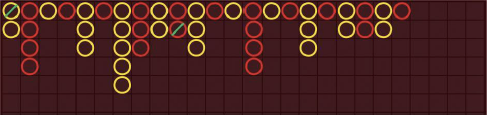
On the Big Road, a Tie is not displayed in a separate cell, but simply as a green line across the most recent result. In the event of multiple ties, a small number is shown next to the green line, representing the number of ties. If a Tie happens before there has been a result in favour of the Dragon or Tiger, the green Tie line is shown in the very top-left cell on the grid, and when the first Dragon or Tiger result is known, that circle is shown in the same cell under the Tie line.
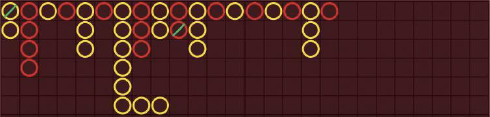
If there are more than six consecutive Dragon or Tiger wins, and the display runs out of vertical space, the situation is called “the dragon”. One popular strategy is to “follow the dragon” and take this trend into account when betting.
THE DERIVED ROADS
The “Big Eye Boy” , “Small Road” and “Cockroach Pig” are all derived from the Big Road and describe the various patterns in it. Derived roads do not tell you exactly what happened – they tell you whether there were patterns and therefore also known as “predictive roads”.
The derived roads are made up of red and yellow symbols: hollow circles for Big Eye Boy, solid circles for the Small Road, and slashes for the Cockroach Road.
The red and yellow symbols that make up the derived roads do not correspond to Dragon or Tiger. Red generally means there is a pattern, and yellow generally means that the shoe is “choppy”, with no pattern.

Each roadmap marks the game results using a different pattern. Specifically, the difference lies in the starting point and in the results scored in the Big Road:
- For Big Eye Boy: the second result in the second column.
- For the Small Road: the second result in the third column.
- For the Cockroach Road: the second result in the fourth column.
Once a derived road starts, an additional red or blue symbol is added to that road after every hand.
Click/tap on any of the derived roads to zoom in the road content.
BEAD PLATE
The Bead Plate is an exact representation of every hand of the shoe. A Tie result is shown in a separate cell in the Bead Plate road and is marked with a green circle.
| Icons |  |
 |
 |
| Meaning | Dragon won | Tiger won | Tie won |
The first symbol appears in the top-left corner of the grid, and the road is filled vertically down through all six cells of the column, then start at the top of the next adjacent column, irrespective of the result of each hand.
By clicking/tapping on the Bead Plate statistics area, you will be able to see the results, shown with letters corresponding to the winning results (Dragon, Tiger, Tie or Suited Tie) or with numbers corresponding to the points totals of the winning hands.
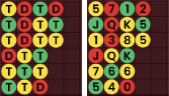
ROADMAP PROBING (ASK DRAGON, ASK TIGER)
Roadmap Probing helps players to predict the outcome of the next round. It shows what the trends will look like in the Big Road, Big Eye Boy, Small Road, Cockroach Road and Bead Plate if either a Dragon or a Tiger result is added.
Press the Ask Dragon button to see the roads if the next result is a Dragon win or press the Ask Tiger button to see how they will look if the next result is a Tiger win.

The symbols on the buttons represent the actual last symbol in each of the derived roads.
NAVIGATION CONTROLS

The Lobby button can be clicked at any time from any game. It allows you to easily change table, select any other live game or simply leave the table. You will not be removed from your current table until you have selected the new table you wish to join, so the Lobby can be used to browse other games while remaining at the current table. Once on the lobby page, please click the Return to Game button in order to exit the lobby and return to your open table.

Clicking the Chat button opens the chat window so you can send messages to the Dealer and other players. Our Dealers will communicate with you directly and answer any questions regarding the game.

If you need to speak with our Live Support team, please select the corresponding chat room by clicking the Support button and you will be assisted in a private chat.
Chat messages are monitored by dedicated Studio personnel at all times. Any chat messages may be deleted, and your chat feature may be blocked if you use inappropriate or rude language with the Dealers and/or other players at the table or flood the chat with unnecessary messages.

Clicking the Volume Control button will open a slider which lets you change the sound volume at your table. Clicking the Volume control button will mute the game – it will then turn into a “Muted” icon.

By default, the game is opened with muted audio. Please click the Muted button to unmute the game. The icon will then turn into the Volume Control button. .

Clicking the History button will open a window showing details of your activity in our Live Casino. By default, it will be opened on your history for Today. You can also see your history from previous days by selecting the Older tab.
Simply select a game round from the list to see details of it, including all your bets. The details of your game round history will be shown in the History window and will be split into 2 parts: game round information and bets information.

Clicking the Game Help button opens the Help window you are in right now.

Clicking the Settings butto opens a Settings window allowing you to set your desired preferences..
In the General tab the following options are available:
- Video stream on/off.
- Manage video quality.
- Manage video content – single or multiple camera view.
- Manage video sounds.
- Manage game effects.
- Language – change the interface language.
In the Bets tab the following preferences are available:
| On Desktop: | On Mobile: |
|
|

By clicking the Classic View button you will change the view of the game to Classic mode where the video will be shown inside a small frame. The virtual table will be available below the video and the graphical cards will be shown for each side.
The game interface may also change automatically to Classic mode if your internet connection is slow or unstable. If this happens, the video will be automatically set to Low video resolution. .

Clicking the Full Screen button will launch Full Screen mode and the game and/or Lobby will fill the entire screen. To exit this mode, either click the button again or press the “Esc” key on your keyboard.
CARDS SHUFFLE AND CARDS CHANGE
Deck shuffling occurs once the postillion (cutting card) is removed from the shoe and the game round has been completed.
When the cutting card appears during play, it will be removed, and the hand completed. The Dealer will announce “The last hand of the shoe”. Upon completion of this hand, no more cards should be dealt until the shoe change or shuffle procedure occurs.
Cards must be shuffled (mixed) by a Shuffler on the accessory table or by the Dealer at the gaming table, according to the established procedure.
The cards change procedure takes place at each card game table once every 24 hours. However, it shall also be done in the following cases:
- Table has been opened after a period of inactivity
- Video stream was unavailable at the table
- More than three cards fell to the floor during the game round
- A card with a defective barcode is present in the shoe.
GAME INCONVENIENCES
You are personally responsible for the correct positioning of your wagers at a Dragon Tiger table.
If any error in the game procedure occurs, the game round will be temporarily paused, and the Shift Manager will be notified. You will be informed by an on-screen notification that the issue is being investigated.
If the Shift Manager can immediately resolve the error (e.g. by rescanning the cards, placing the cards in the correct positions, etc.) the game round will continue as normal.
If immediate resolution is not possible, the game round will be cancelled, and initial bets will be refunded to all players who participated in the game round.
A bet may be rejected by the system after the betting time is finished due to not being placed in time, not meeting the minimum or maximum requirements, or to other transaction issues.
If you place a wager that is lower than the minimum table bet limit, it will be shown as an inactive chip. You will be informed about this via the small tooltip window above your bet. Once the betting time is over, all inactive chips will be rejected.
If your bet exceeds any maximum bet limit, it will be adjusted automatically, and you will be informed about this via the small tooltip window above your bet.
If the game ends with what you consider to be a wrong result, or in the event of any other irregularities, please contact Live Support within the game or Casino Time Customer Support.
DISCONNECTION POLICY
Pragmatic Play Live Casino services are provided over the internet, from which you may be disconnected at times. This poses potential problems to the game flow and your user experience.
In order to minimize the impact of unexpected disconnections, when you lose connectivity to the game server, a reconnect message will be displayed on the screen.
The following error handling rules apply in the event of disconnection:
- If a disconnection occurs before the “BETS CLOSED” message appears on the screen and your bets were not yet accepted by the server, your bets will not be deducted from your balance and you will not participate in the game round. Once reconnected, please verify your balance and inform your Casino Operator immediately if there are any issues.
- If a disconnection occurs after the “BETS CLOSED” message appears on the screen and your bets were accepted by the server, the game will proceed as normal and any winnings will be processed according to the game result regardless of the disconnection.
After being disconnected, please check your winnings in the History window and if you have any doubts regarding game outcomes, please contact Live Support within the game or Casino Time Customer Support, providing them with details of the game in question including the the game name and the exact time it occurred.
If connection to the table from the Studio is lost for more than 5 minutes, the game will be cancelled.
If we determine that you would have won the game round, your winnings will be credited to your account through Casino Time Customer Support.