GAME OVERVIEW
Jacks or Better Draw Poker is a Live Casino game inspired by the classic video Poker game played with one standard 52-card deck.
The aim of Draw Poker is to make the best possible five-card poker hand.
You can discard any or all of the five initial cards and be dealt new cards to replace the discarded ones. Your final five-card hand is paid according to the Payout table.
HOW TO PLAY
To play, select the value of your bet and place it on the PLAY bet spot when the betting timer starts.

Your total bet will be displayed in the Total Bet field.
Once the timer runs out, the Dealer deals five initial cards to you face-up.
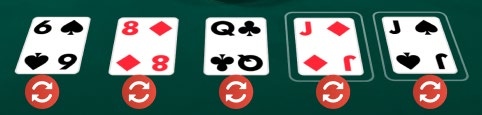
The decision time will then begin, during which you must select which cards to keep. You can choose to keep or discard as many cards as you like, from none to five. Click/tap the cards to select the ones you want to keep. To undo the selection, click/tap again.
Once the timer runs out, all unselected cards are discarded, and the dealer deals five additional cards. Any cards you have chosen to discard will be automatically replaced by the newly dealt cards. For example, if you chose to discard three cards from your initial hand, then the first three additionally dealt cards will replace the ones you discarded.
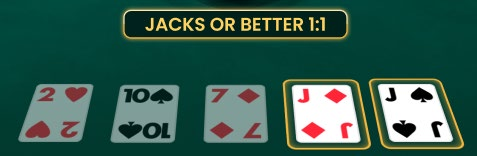
Your final five-card hand is paid according to the Payout table. Your initial bet is included in the payout.
Simplified Strategy
If you are disconnected and no cards are kept, a simplified strategy is applied:
- If you have a pair of jacks or higher, hold the cards that make that hand rank and discard the rest.
- If you have four cards to a flush, hold those four.
- If you have an outside straight draw, hold those four.
- If you have any pair, hold that pair.
- If you have an inside straight draw, hold those four.
- If you have a jack or higher, hold your highest card.
- Hold no cards.
Jackpot Bet
The JACKPOT bet is an optional side bet. To bet on the JACKPOT bet spot, you must first place a bet on the PLAY bet spot.

You win if your initial five-card hand – before the decision phase – forms any of the following combinations:
- Straight Flush
- Four of a Kind
- Straight
Your bet must cover the JACKPOT bet spot to qualify for the winnings.
Winning Hands
The individual cards are ranked in descending order: Ace, King, Queen, Jack, 10, 9, 8, 7, 6, 5, 4, 3 and 2.
An Ace can be the highest-value card in a Straight of A, K, Q, J, 10 or the lowest-value card in a Straight of 5, 4, 3, 2, A.
Hand combinations from highest payout to lowest:
 | Royal Flush is a Straight Flush containing the A, K, Q, J and 10 all of the same suit. |
 | Straight Flush contains five cards in sequence, all of the same suit, e.g. 9, 8, 7, 6 and 5, all Hearts. |
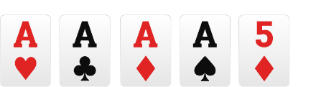 | Four of a Kind contains all four cards of one rank plus any other card, e.g. four Aces. |
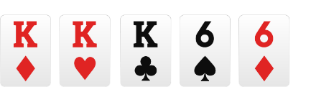 | Full House contains three cards of one rank and two matching cards of another rank, e.g. three Kings and two Sixes. |
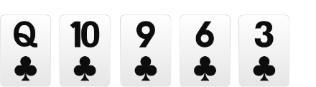 | Flush contains five cards all of the same suit, e.g. five cards that are all Clubs. |
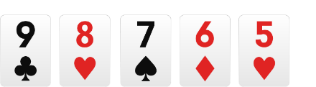 | Straight contains five cards of sequential rank, e.g. 9, 8, 7, 6 and 5. |
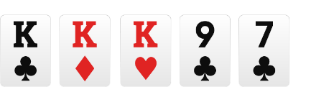 | Three of a Kind contains three cards of the same rank, plus two other cards, e.g. three Kings. |
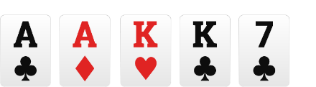 | Two Pairs contains two cards of the same rank, plus two other cards of equal rank to each other, and another card that does not match any of the others, e.g. two Aces and two Kings. |
 | Jacks or Better contains a pair of Jacks or higher rank cards, and any three other cards. |
Only the best hand combination is paid.
Payouts
| HAND | PAYOUT |
| Royal Flush | 800 |
| Straight Flush | 50 |
| Four of a Kind | 25 |
| Full House | 9 |
| Flush | 6 |
| Straight | 4 |
| Three of a Kind | 3 |
| Two Pairs | 2 |
| Jacks or Better | 1 |
JACKPOT
| HAND | PAYOUT |
| Straight Flush | 20,000 |
| Four of a Kind | 1000 |
| Straight | 100 |
Placing Bets
The Table Name indicates the table you are currently playing at, and the Table Limits show the minimum and maximum bets allowed at the table.
When clicking/tapping this area, the Bet Limits & Payouts window opens, showing the minimum and maximum limits and payout odds for each bet type.

The Game Information Indicator informs you of the game status.
While the timer is displayed, you may place your bets.
The Chip Display allows you to select the value of the chips you wish to bet with. Only chip values that can be covered with your current Balance are available.

The Rebet button allows you to repeat the same bets from the previous game round. Once you have clicked/tapped the Rebet button, the Double and Undo buttons are enabled.

The Double button doubles all your placed bets. Every click/tap doubles your bets up to the maximum limit.

The Undo button removes the last bet you placed. This button is available only during the betting time. Once bets are closed, you will not be able to undo or change your bets. Clicking/tapping the Undo button repeatedly removes bets one by one, with the most recent bet removed first.

The Balance indicator shows your available funds and currency. Your balance has to be sufficient to cover all your placed bets.
If your balance is not updated (after placing bets, losing or winning), please refresh your game.
The Cashier button will open the Cashier window for deposits and withdrawals. On mobile devices the Cashier button is available inside the game Menu.
The Total Bet indicator shows the total value of all bets placed in the current game round.

Game Result
After all the cards are dealt, the winnings are calculated based on the Payout table. The total win amount is displayed in the win message on your screen.

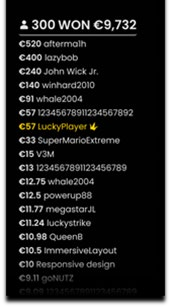
The Winner List is displayed at the end of the game round and shows the nicknames of all the players who won at the current table in the last game round. The winning amount is shown in your currency.
Navigation Controls
The Lobby button can be selected at any time from any game. It allows you to easily change the game table, select any other live game or simply leave the table. You will not be removed from your current table until you have selected the new game table you wish to join. You can use the Lobby to browse other games while remaining at the current table. Once on the Lobby page, please click/tap the Close Lobby button to exit the Lobby page and return to your open table.

Clicking/tapping the Chat button opens the chat window. You can chat with the Dealer and other players. The dealer will communicate with you directly and answer any questions regarding the game.

If you wish to speak with the Live Support, please select the corresponding chat room by clicking/tapping the Support button, and you will be assisted in a private chat.

Chat messages are monitored by dedicated Customer Support personnel at all times. Players who misuse Chat by abusing the Dealer or other players, or by using inappropriate and/or offensive language might have their chat privileges disabled.
Clicking/tapping the Volume Control button opens a slider and lets you adjust the sound volume at your table. Click/tap the Volume control button to mute the sound. To unmute, click/tap the Volume Control button icon again.

Click/tap the History button to launch a window showing details of your gaming activity. By default, it will open your history for today. Under the tab Older you can view your previous gaming history.

Simply select a game round from the list to review it in detail, arranged by game round information and information about bets.
Clicking/tapping the Game Help button opens the Help window.

Click/tap the Settings button to open the Settings window allowing you to select your preferences.

Under the tab General following settings are available:
- Manage video quality
- Manage game sounds
Clicking/tapping the Classic View button changes the game view to Classic mode, showing the video inside a small frame. Below the video, the virtual table with graphical cards displayed for each side will be available.

The game interface may also change automatically to Classic mode if your internet connection is slow or unstable. If this happens, the video will be automatically set to Low video resolution.
Click/tap the Full Screen button to launch the Full Screen mode. To exit this mode, click/tap the button again or use the “Esc” key on your keyboard.

Subtitles
Subtitles may not be completely accurate. Please refer to the information from the in-game user interface as the primary source.
Cards Shuffle and Change
Cards are shuffled by a shuffling machine according to the shuffling procedure.
Two decks of cards are used: one is shuffled while the other is used for a game round, then the decks are swapped.
The card change procedure occurs once every 24 hours or, additionally, in the following cases:
- Table has been opened after a period of inactivity.
- Video stream was unavailable at the table.
- More than three cards fell on the floor during the game round.
- A card with a defective barcode is present in the shoe.
Game Inconveniences
If there is an error in the game, system, game procedure or transaction activity, the game round will be temporarily paused, and the Shift manager immediately notified. You and other players will be informed by an on-screen notification that the issue is being investigated.
If the error can be immediately resolved, the game round will continue as usual. If immediate resolution is not possible, the game round will be cancelled, and initial bets will be refunded to all players who participated in the game round.
If you wish to discuss any game related issues, please contact Live Support, providing them with details of the game in question including the the game name and the exact time it occurred.
Disconnection Policy
Pragmatic Play Live Casino services are delivered over the Internet, and occasionally disconnections may occur.
After being disconnected, check your winnings in the History window. If you have any questions regarding the game outcomes, please contact Live Support within the game or Casino Time Customer Support, providing them with details of the game in question including the the game name and the exact time it occurred.