GAME OVERVIEW
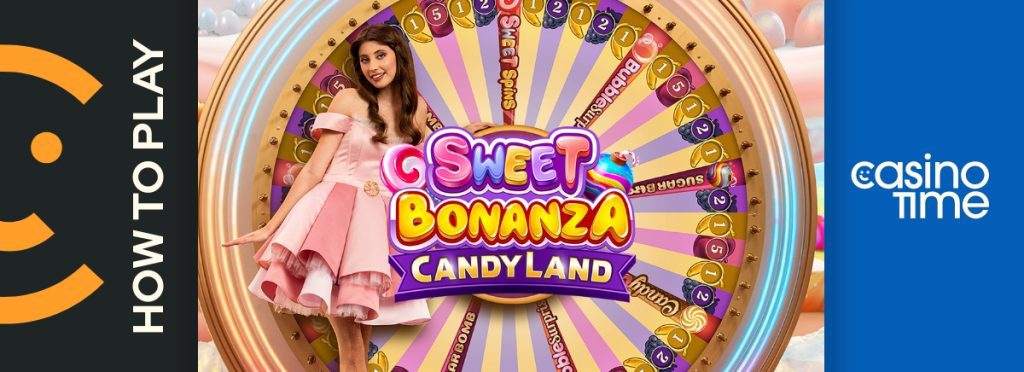
Sweet Bonanza CandyLand is a great combination of classic Money Wheels that are very popular in land-based casinos and the theme of the famous Pragmatic Play’s slot – Sweet Bonanza.
In addition, it contains 2 exciting Bonus games – Sweet Spins and Candy Drop described in detail further. This game is a fun-filled live casino game of chance with unique special features that will thrill casino players and the slot fans. Hosted by specially trained and entertaining hosts, this game has the real feel of a TV game show combined with a video game and provides a truly immersive playing experience.
The game features a super-sized, vertically mounted wheel containing 54 coloured segments presenting different numbers (symbols): 1, 2, 5. Each number means the corresponding payout. In addition, it contains 3 segments with a Sugar Bomb symbol, 3 segments with a Bubble Surprise symbol, 2 segments with a Candy Drop symbol, and 1 segment with Sweet Spins. Each one of the symbols mentioned corresponds to one of these special features.
The objective of the game is to correctly predict the segment in which the wheel will stop. By predicting the right number, the Player earns a payout on their bet. The special features can give additional wins by multiplying the initial bet depending on the type of the bet placed.
HOW TO PLAY
In Sweet Bonanza, bets must be placed during the betting time on the Sweet Bonanza layout that displays six available betting positions corresponding to the segments on the wheel.

In addition, you can enable the special feature of this game – Sugar Bomb Booster located on the game User Interface (UI).
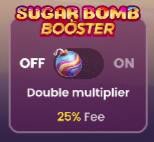
It will double the Multiplier generated when the wheel stops on the Sugar Bomb segment.
All players will be eligible to receive the Multiplier generated in this situation, but the Multiplier will be doubled for players who enabled the Sugar Bomb Booster.
Enabling this special feature costs an additional 25% of the total bet placed on the bet areas described above.
To start playing, wait until the message “PLEASE, PLACE YOUR BETS” appears, then select the value of the chip(s) you would like to wager on a given spin and place it on the appropriate betting field(s) on the layout.
Your total bet will be displayed in the “Total Bet” window.
Bets can be placed during the betting time until the game Host announces: “BETS CLOSED”. No bets will be accepted after this point.
The game Host will spin the wheel according to the “Sweet Bonanza Wheel valid spin rule” described below.
When the wheel comes to rest and the pointer is inside a segment between two pins, the game result is determined and will be highlighted on the game interface. If any of your bets are covering the winning number, you receive winning returns according to the winning symbol odds as described in the “Bets and Payouts” section below. The amount will be shown in the win message in the centre of the screen and will include your initial bet.
Bets and Payouts
Main Game
You may place wagers on any of six symbols (1, 2, 5, Bubble Surprise, Sweet Spins and Candy Drop) you think the wheel will stop at. Your wager will:
- Win if the pointer stops inside a segment with that symbol.
- Lose if the pointer stops inside a segment with any other symbol.
You may cover all six bet types in the same game round.
Winning wagers will be paid out in accordance with the payout odds of the winning segment which may vary from the minimum value (the number displayed on the segment of the wheel itself and on the betting layout) to the maximum value which depends on the results of the Bonus games and Sugar Bomb Multiplier (considering the Sugar Bomb Booster that can also double it). Your stake is returned on top of your winnings.
When the Sugar Bomb segment lands on the wheel, these steps will occur:
- A Multiplier will be randomly chosen from the range of the Multipliers shown in the Table below.
- The Host will re-spin the Wheel with Sugar Bomb Multiplier:
- All bets remain on bet spots, no new or additional bets are allowed.
- Multiplier indicator is displayed for all placed bets.
- The outcome of the next spin will determine the winning wager as usual, but the payout of the outcome will be multiplied by the Sugar Bomb multiplier.
- If the wheel stops on a Sugar Bomb sector again, all bets remain on bet spots and the multiplied payout from the last spin is multiplied again. The game Host will spin again and will continue to spin until the spin ends with a valid result (i.e Number sector, Sweet Spins or Candy Drop).
- All paid amounts (both Number and Bonus Games) will be multiplied by the Sugar Bomb Multiplier.
| Multiplier |
| 2x |
| 3x |
| 4x |
| 5x |
| 6x |
| 7x |
| 8x |
| 9x |
| 10x |
Bonus Games
Sweet Spins Bonus
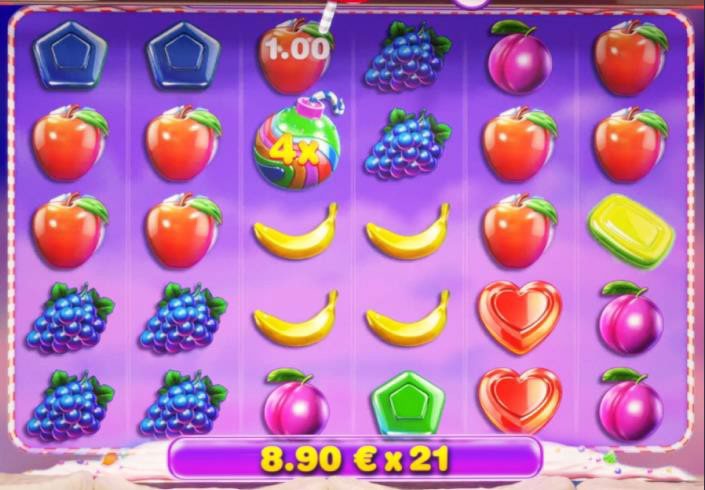
If you placed a bet on a “Sweet Spin” segment and the Wheel stops on it, you will qualify for this Bonus game round.
In this bonus game, the symbols will be shown located on the 6×5 grid. They will behave according to the TUMBLE FEATURE, which means that after every spin, winning combinations are paid, and all winning symbols disappear. The remaining symbols fall to the bottom of the screen and the empty positions are replaced with symbols coming from above.
Tumbling will continue until no more winning combinations appear because of a tumble. There is no limit to the number of possible tumbles.
- This bonus game has 8 symbols that will pay according to the total number of the same symbol anywhere on the screen after every spin and as a result of tumbling after it.
- The winnings are calculated individually according to your bet placed on the “Sweet Spins” bet area multiplied by the multiplier of the winning combination according to the Paytable shown below.
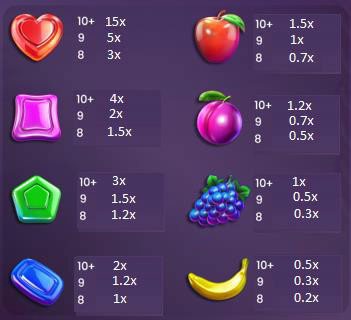
This Bonus Game has the following special symbols:
A. Multiplier (Sugar bomb)
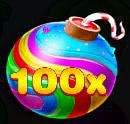
- The Multiplier symbol is present on all reels.
- It does not pay itself.
- It contains a random multiplier (from 2x to 100x).
- Total award for a spin is multiplied by the Sum of the multipliers on the Symbols anywhere on screen.
- The Sum of Symbol Multipliers is calculated by formula Multiplier 1 + Multiplier 2 and so on.
B. Scatter (Lollypop)

- The Scatter symbol is present on all reels.
- 3 Scatters add 5 Sweet Spins.
- It pays as follows:
4 Scatters anywhere on screen pay 3x
5 Scatters anywhere on screen pay 5x
6 Scatters anywhere on screen pay 100x
The amount won in this Bonus game will be multiplied by the Sugar Bomb Multiplier if it started after the Sugar Bomb segment landed on the wheel.
Candy Drop Bonus
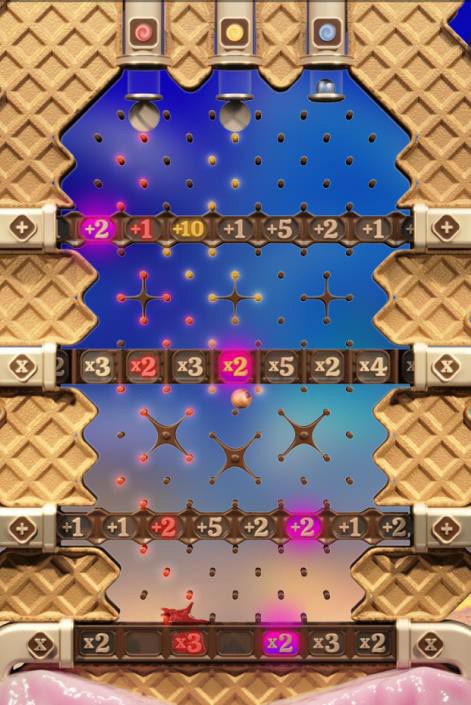
If you placed a bet on a “Candy Drop” bet area and the wheel stops on it, you will qualify for this Bonus game round.
In this Bonus round you will see 4 rows with a sequence of positions with additional numbers that increase the win (e.g. +5) or Multipliers (e.g. 4x) spread through every row.
In addition, the positions marked with a purple colour will show the Jackpot path. The Jackpot will be paid as 999:1 (1,000x) on your Bet placed on the Candy Drop bet area if the Candy you selected passes through all positions of the Jackpot path. In addition, you will be paid with the Multiplier collected from the positions of this path.
- In the beginning of this Bonus game, you will be asked to select 1 of 3 “Candies”.
- Select the Candy you prefer during the allowed time, otherwise one of the Candies will be selected for you randomly.
- Initially, each Candy has 1x Multiplier.
- Each Candy will be dropped one by one in sequence from left to right following the algorithms imitating the real physics of a free fall.
- Each Candy will pass through obstacles and collect win increasing numbers or Multipliers from 4 rows.
- As a Candy falls through the obstacles, it will indicate its path by its colour.
- The final Multiplier of your bet on the Candy Drop bet area is determined by the sum of the win increasing number and multipliers collected by the Candy and you will see on the screen the final Multiplier you won.
- The winning is calculated and displayed for you individually according to your bet placed on the Candy Drop bet area, multiplied and added by the multiplier resulted at the end of this Bonus round.
- The amount won in this Bonus game will be multiplied by the Sugar Bomb Multiplier if it started after the Sugar Bomb segment landed on the wheel.

Bubble Surprise Bonus
If you placed a bet on a “Bubble Surprise” segment and the wheel stops on it, you will qualify for this Bonus game.
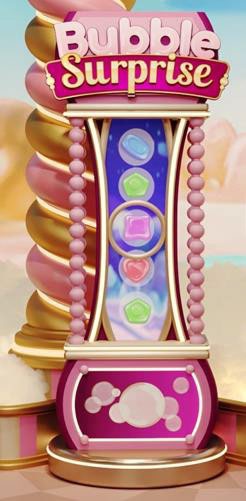
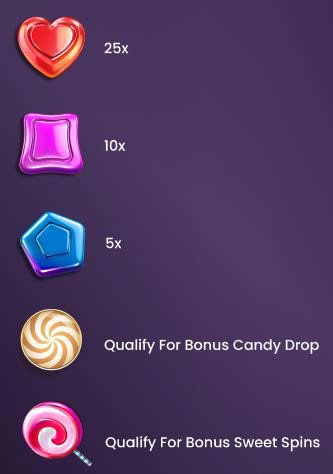
In this bonus game, one reel with 5 different possible outcome symbols will move vertically up by rapidly increasing speed. When the reel stops, the symbol located in middle, marked with golden circular pointer, will be awarded as the winning symbol.
The possible outcomes and the corresponding symbols are described below.
- Blue Candy – 5x payout.
- Purple Candy – 10x payout.
- Red Heart Candy – 25x payout
- Candy Drop symbol – triggers the Candy Drop Bonus game described above.
- Sweet Spins symbol – triggers the Sweet Spins Bonus game described above.
The Last Winning Combinations
The Last Winning Combinations are always shown at the bottom of the screen. The most recent winning symbol is clearly visible on the left.

- If the result followed the Sugar Bomb(s), it will be shown in the corresponding order.
- The Multiplier of the Sugar Bomb(s) will be also shown with a soft animation appearing on the top of the Sugar Bomb icon.

 By clicking the Statistics button from the User Interface, you will be able to see more detailed stats of the game as shown below.
In this Stats window, the results will be shown for the ranges of 100, 200, 300, 400 and 500 last rounds.
Placing Bets
When placing bets, please pay attention to the following screen elements to make sure your bets are placed on time and successfully validated.
The Table Name indicates the table you are currently playing at and the Table Limits show the minimum and maximum stakes allowed at the table. When clicking on this area, the Bet Limits & Payouts window will be opened showing the minimum and maximum limits for each bet type as well as the payout odds.
The Game Information Indicator will inform you of the game status, the remaining time for placing bets, the status of your bets, the winning symbol, etc.

“PLEASE, PLACE YOUR BETS” is shown to tell you when you may start placing your bets. The indicator bar will show the remaining time in green, which will decrease to the left. “LAST BETS” is shown when only 5 seconds of the betting time remain. This indicator will be coloured orange.
“BETS CLOSED” means that there is no more time to place bets and all betting areas will become inactive.
After the betting time is over, you will receive a “BETS ACCEPTED” message indicating that your bets have been accepted and will participate in the game round. Otherwise, you will receive a message stating “NOT ALL BETS ACCEPTED” or “BETS REJECTED” in cases described in the “Game Inconveniences” section of this guide.
The message “WAIT FOR NEXT GAME” is shown if you have no bet placed in the current game round. After it is over, you may place your bets during the next betting time.
A “LOW BALANCE” message on the status bar means that your balance is too low to cover the minimum bet amount allowed at the table. You will need to add funds to your balance to be able to participate in the game.
A “GAME PAUSED” message will appear if the game is temporarily suspended due to game Host failure, equipment failure, or other unforeseen circumstances.
A “GAME CANCELLED” message will appear on the status bar if the game round is cancelled due to unforeseen circumstances and immediate resolution is not possible. For more information about “Game Cancelled” cases, please refer to the “Game Inconveniences” section of this guide.
The Chip Display allows you to select the value of the chips you wish to bet with. On Desktop you can see all available chip values on the bottom of the screen close to the Rebet, Double and Undo buttons. On Mobile you can tap on the chip in the lower part of the screen in order to see all available values. Only chip values that can be used with your current Balance will be available.

You may cover all six bet types in the same game round by clicking/tapping on the BET ON ALL button during the betting time. Bets will be placed with your selected chip value.

 The Re-bet button allows you to repeat the same bets from the previous game round. Once you have clicked/tapped the Re-bet button, the Double and Undo buttons are enabled
 The Double button doubles all your placed bets. Every click/tap doubles your bets up to the maximum limit.
 The Undo button removes the last bet you placed. This button is available only during the betting time. Once bets are closed, you will not be able to undo or change your bets. Clicking/tapping the Undo button repeatedly removes bets one by one, with the most recent bet removed first.
The Balance indicator shows your available funds and the currency.Your balance has to be sufficient to cover all your placed bets.
If your balance is not updated (after placing bets, losing or winning), please refresh your game or click/tap the F5 key on your keyboard.
 The Cashier button will open the Cashier window for deposits and withdrawals. On mobile devices the Cashier button is available inside the game Menu.
The Total Bet indicator shows the total value of all bets placed in the current game round.
Game Result
The winning symbol of the game round will be evidenced on the betting layout. It will help you to easily identify the winning symbol on the Sweet Bonanza layout and understand whether it was covered by your winning chips.
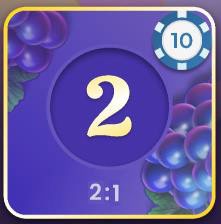
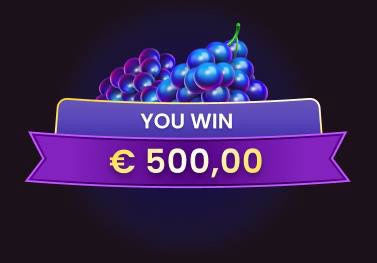
If you are the winner, your win amount will be indicated in the win message.
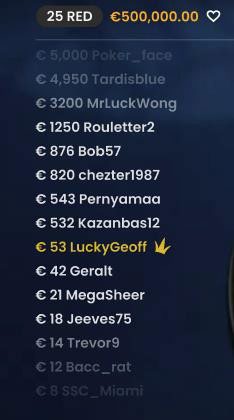
The Winners List will appear at the same time as the winning symbol and will show the nicknames of all the players who won at the current table in the last game round. The winning amounts are shown in the currency of the players.
Navigation Controls
 The Lobby button can be clicked at any time from any game. It allows you to easily change table, select any other live game or simply leave the table. You will not be removed from your current table until you have selected the new table you wish to join, so the Lobby can be used to browse other games while remaining at the current table. Once on the lobby page, please click the Return to Game button in order to exit the lobby and return to your open table.
 Clicking the Chat button opens the chat window so you can send messages to the Dealer and other players. Our Dealers communicate with you directly and answer any questions regarding the game.
 If you need to speak with our Live Support team, please select the corresponding chat room by clicking the Support button and you will be assisted in a private chat.
Chat messages are monitored by dedicated Studio personnel at all times. Any chat messages may be deleted, and your chat feature may be blocked if you use inappropriate or rude language with the Dealers and/or other players at the table or flood the chat with unnecessary messages.
 Clicking the Volume Control button opens a slider which lets you change the sound volume at your table. Clicking the Volume control button mutes the game – it will then turn into a “Muted” icon.
 By default, the game is opened with muted audio. Please click the Muted button to unmute the game. The icon then turns into the Volume Control button.
 Clicking the History button opens a window showing details of your activity in our Live Casino. By default, it is opened on your history for Today. You can also see your history from previous days by selecting the Older tab.
Simply select a game round from the list to see details of it, including all your bets.
The details of your Sweet Bonanza game round history are shown in the History window, split into two parts: game round information and bets information.
 Clicking the Game Help button opens the Help window you are in right now.
 Clicking the Settings button opens a Settings window allowing you to set your desired preferences. In the General tab the following options are available:
- Manage video quality
- Manage Game quality.
- Change interface language.
 By clicking the Classic View button, you can change the view of the game to Classic mode where the video is shown inside a small frame.
The game interface may also change automatically to Classic mode if your internet connection is slow or unstable. If this happens, the video is automatically set to Low video resolution.
 Clicking the Full Screen button launches Full Screen mode and the game and/or Lobby fills the entire screen. To exit this mode, either click the button again or press the “Esc” key on your keyboard.
Sweet Bonanza Wheel valid Spin Rule
A winning symbol is confirmed as valid only when the spin is deemed valid. A valid spin is defined as follows:
The wheel must complete at least two complete rotations counted from the segment where the pointer came to rest in the previous game round.
If the spin is defined as invalid, this situation is called a “No Spin”.
A “No Spin” will be declared if:
- The wheel did not complete two revolutions;
- The pointer comes to rest on a pin between 2 segments;
- There is physical interference of any kind with the spin;
- The game Host didn’t change the direction of the wheel;
- There is any kind of a mechanical malfunction affecting the wheel or its supporting structure.
In the event of a “No Spin”, the game Host will re-spin the wheel based on our standard operating procedures.
Your wagers will remain in play until a valid spin is made.
Game Inconveniences
You are personally responsible for the correct positioning of your bets on the Sweet Bonanza layout.
In the event of any technical malfunction or human error, the instance is reported to the Shift Manager immediately.
If any error in the game procedure occurs, the game round is temporarily paused, and the Shift Manager is notified. You will be informed by an on-screen notification that the issue is being investigated.
If the Shift Manager can immediately resolve the error, the game round continues as normal. If immediate resolution is not possible,and initial bets will be refunded to all players who participated in the game round.
A bet may be rejected by the system after the betting time is finished due to not being placed in time, not meeting the minimum or maximum requirements, or to other transaction issues.
If you place a wager that is lower than the minimum table bet limit, it will be shown as an inactive chip. You will be informed about this via the small tooltip window above your bet. Once the betting time is over, all inactive chips will be rejected.
If your bet exceeds any maximum bet limit, it will be adjusted automatically, and you will be informed about this via the small tooltip window above your bet.
If the game ends with what you consider to be a wrong result, or in the event of any other irregularities, please contact Casino Time Customer Support, providing them with details of the game in question including the the Game name and the exact time it occurred.
Disconnection Policy
Pragmatic Play Live Casino services are provided over the internet, from which you may be disconnected at times. This poses potential problems to the game flow and your user experience.
In order to minimize the impact of unexpected disconnections, when you lose connectivity to the game server, a reconnect message will be displayed on the screen.
The following error handling procedures apply in case of a disconnection:
- If disconnection occurs before the BETS CLOSED message appears on the screen and your bets were not yet accepted by the server, your bets will not be deducted from your balance, and you will not participate in the game round. Once reconnected, you can view bet outcomes in the History window.
- If a disconnection occurs after the BETS CLOSED message appears on the screen and your bets were accepted by the server, the game round continues as usual, your placed bets remain valid and are settled in your absence. Once reconnected, you can view bet outcomes in the History window.
After being disconnected, please check your winnings in the History window and if you have any doubts regarding game outcomes, please contact Live Support within the game or Casino Time Customer Support, providing them with details of the game in question including the the Game name and the exact time it occurred.
If connection to the table from the Studio is lost for more than 5 minutes, the game will be cancelled.
If we determine that you would have won the game round, your winnings will be credited to your account through Casino Time Customer Support.
PAYOUTS
In Sweet Bonanza CandyLand, the following payouts are offered:
| Segment on Wheel | Number of Segments | Payout |
| 1 | 23 | 1:1 |
| 2 | 15 | 2:1 |
| 5 | 7 | 5:1 |
| Bubble Surprise | 3 | According to Bonus Game outcome |
| Candy Drop | 2 | According to Bonus Game outcome |
| Sweet Spins | 1 | According to Bonus Game outcome |
| Sugar Bomb | 3 | According to the Multiplier generated from the range 2x – 10x In the case of many Sugar Bombs in a row, all their Multipliers are multiplied between them. |
The maximum possible payout in this game is 19,999:1 (20,000x) or $777,242.34 (whichever of the two is reached first) and the Regular Game / Bonus Games will continue as regular after the maximum payout is reached.